Obtain a Copy of the Data Associated With Your Tesla Account
As part of putting you in control of your data and privacy, Tesla gives you the ability to request a copy of the data associated with your Tesla Account. Access to this feature varies by location.
Learn how to request a copy of certain data that Tesla stores and find answers to common questions about the process and the information you can expect to receive.
You can request a copy of the data associated with your Tesla Account. This information may include:
- Order details
- Account information
- Customer support activity
- Service history from your ownership period
- Vehicle usage information
- Safety events (if applicable)
- Infotainment system settings information
- Mobile app usage information
- Supercharging history
When you request a copy of your data, we first verify that you are the account holder making the request. After verification, we organize the data associated with your Tesla Account in file formats that are easy to understand. When the data is ready, we will notify you by email that it’s available for download. You have 7 days to download your data, after which time it is removed from that location, and you will need to request it again. If you submit a secondary request, due to our established retention guidelines, the data provided to you may be different as the available information may have changed.
Note: Downloading your data does not delete it from Tesla’s servers.
Tesla strives to collect and store the minimum amount of data required to provide the services you use. Therefore, when data isn’t provided it is because it is either in a form that is not personally identifiable or linked to your Tesla Account, is stored in an end-to-end encrypted format that Tesla cannot decrypt, is not customer related, is not stored by Tesla at all, or is not currently part of a standard request. Additionally, some data may have been held for only a very short time and is no longer on our servers. For more information on our data sharing practices, refer to Tesla's Privacy Notice.
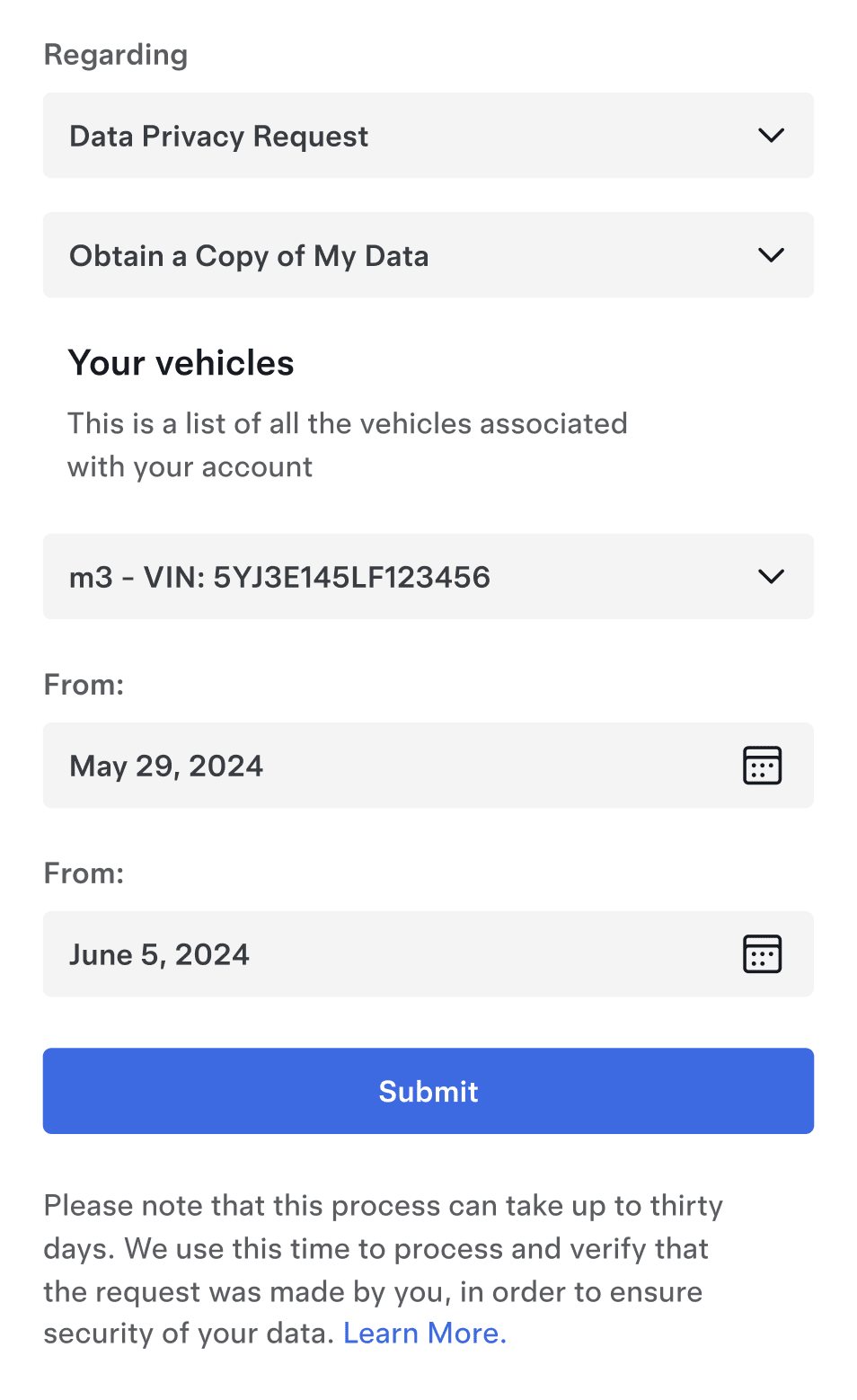
To request a copy of your data, follow these steps:
- Navigate to our web form and sign in to your Tesla Account.
- Select ‘Data Privacy Request’ and ‘Obtain a Copy of My Data.’
- Select ‘Submit.’
- Specify the time range for which you would like to request your data. Select ‘Submit.’
We will verify your request and notify you by email when your data is ready. As a reminder, this process can take up to 30 days, or the prescribed response time in your location, whichever is shorter.
When we collect data, we believe it’s important for you to know what we’re collecting and what it is used for. The data provided to you as part of your request may include information such as Tesla Account details, customer support activity, service history and vehicle data. Tesla vehicles record operational and diagnostic data at regular intervals, and may transmit that data over-the-air to our servers. That data enables our Engineering team to assess vehicle health remotely and diagnose, and potentially proactively resolve your concerns.
Note: The dataset is not able to be modified. Customer Support and Service teams are not able to view or provide additional information on this data. Refer to the table below for what is provided as part of a data request.
| Processed directly on vehicle by default | Shared with Tesla, but not associated with your account | Shared with Tesla and associated with your account | |
|---|---|---|---|
| Sentry Mode camera recordings | ✓ | Not shared with Tesla | Not shared with Tesla |
| Dashcam camera recordings | ✓ | Not shared with Tesla | Not shared with Tesla |
| Cabin camera data | ✓ | If opted in through Data Sharing | N/A |
| Camera recordings | ✓ | If opted in through Data Sharing | In the occurrence of a safety critical event only |
| Location data | ✓ | If opted in through Data Sharing | In the occurrence of a safety critical event only |
| Speed | ✓ | For fleet analysis and improvement | In the occurrence of a safety critical event only |
| Voice commands | ✓ | Not shared with Tesla | Not shared with Tesla |
| Browsing history | ✓ | Not shared with Tesla | Not shared with Tesla |
| Odometer | ✓ | For fleet analysis and improvement | Last known value only, for warranty calculation |
| Charging data | ✓ | If third-party charging network used | If Supercharger network used |
| Touchscreen interactions | ✓ | ✓ | N/A |
The vehicle data provided to you lists your vehicle signals across the top of the file and the VIN, and timestamps for the signal updates are provided in the left-most columns, respectively. We provide your vehicle data in an industry-standard format that is easy to open and read (such as .csv, .json, .html or .pdf formats).
Tesla vehicles make use of a camera suite that provides advanced features such as Actually Smart Summon, Autopark and more. This camera functionality has been designed from the ground up to protect your privacy. Tesla does not continuously collect personally identifiable camera recordings and in fact, most processing takes place without ever leaving the vehicle. In order for camera recordings to be shared with Tesla, your consent is required and can be controlled through the vehicle’s touchscreen at any time (Software > Data Sharing). Sentry Mode and Dashcam recordings are not shared with Tesla.
Even if you choose to opt-in for data sharing, camera recordings remain anonymous and are not linked to you or your vehicle. Therefore, Tesla cannot provide these recordings upon request unless we receive the recording as a result of a safety event (such as a vehicle collision or airbag deployment). You may also refer to the Owner’s Manual for your vehicle for more information on how you can record or retrieve recordings from your vehicle.
Tesla gives you the ability to permanently delete your Tesla Account and its associated data at any time, for any reason. All active Tesla products must be removed from your account before requesting deletion.
To delete your Tesla Account and data from the Tesla website, follow these steps:
- Sign in to your Tesla Account.
- Select ‘Data & Privacy’ > ‘Delete Account.’
- Follow the prompts.
To delete your Tesla Account and data from the Tesla app, follow these steps:
- Open the Tesla app.
- Tap the menu in the top-right corner.
- Tap your name > ‘Security & Privacy.’
- At the bottom, tap ‘Delete Account.’
- Follow the prompts.
What to Expect
- All personal data associated with your account will be erased permanently.
- You will not be able to access Tesla vehicles and energy products or services.
- You will not be able to access your documents, statements and receipts.
- You will not be able to sign in using this account on web or from the Tesla app.
- Any outstanding balances on your account must be paid.
- Any demo drive appointments that you have scheduled will be canceled.
- Any referral links will be deactivated.
Note: Before deleting your account, download all documents, statements and receipts.
After You Request Deletion
When you submit your request, we first verify that you are the account holder. After this verification is complete, account details and data associated with your account are permanently deleted from Tesla’s servers. At that point, you can no longer sign in to your account or access any data, content or services that were associated with your Tesla Account.
When you initiate deletion, we make our best effort to delete all personal data associated with your account. However, we are required to retain past transaction information for financial reporting purposes, and we may be required to retain certain information to comply with a court settlement or other ongoing legal procedure. In these circumstances, we will minimize your data or apply other privacy techniques such as anonymization.