Range Tips
Tesla vehicles can travel some of the longest driving ranges of any other production electric vehicle (EV) on the market. Range is the estimated distance your Tesla vehicle can travel on a single charge. You can choose to display range as either a percentage of battery energy remaining, or an approximation of remaining miles that can be driven.
When shown in miles, the displayed range in your vehicle is based on regulatory agency certification (EPA) test data, not your personal driving patterns. It's natural for the displayed range on your vehicle to fluctuate or decrease at a different rate than the actual distance driven, since it reflects EPA-rated efficiency—while your real-world range depends on vehicle speed, driving style, weather, terrain and other factors affecting the vehicle energy consumption. Track your real-world range through the Energy app on your vehicle's touchscreen.
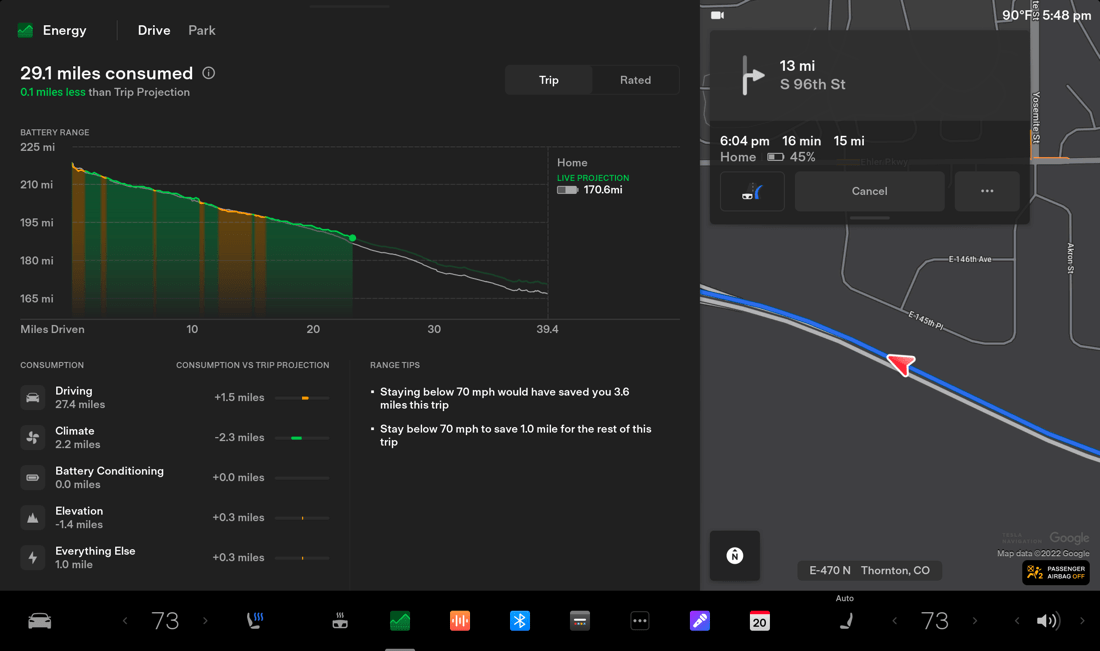
The Energy app located on your vehicle’s touchscreen is designed to help you maximize efficiency and range. The Energy app lets you:
- Monitor the amount of energy your vehicle uses while driving and parked
- See how much energy is consumed by different vehicle components, driving behaviors and environmental conditions
- Compare the actual energy used to the trip projection and the battery indicator
- Receive personalized suggestions for using energy more efficiently based on your driving patterns
- Compare the energy consumption of the vehicle over the last 10, 100 or 200 miles along with your projected range based on the average consumption over the distance selected
To access the Energy app, open the apps menu on your vehicle’s touchscreen and select the Energy icon.
Your driving behaviors and environment play a big role in your vehicle’s real-world range.
As you drive, be mindful of common reasons your range may decrease more rapidly:
- High driving speeds: Driving at higher speeds uses significantly more energy because air resistance increases rapidly. Additionally, energy from speed is proportional to the square of speed. For example, doubling your speed can require up to four times as much energy per mile, greatly reducing your vehicle's range.
- Hard accelerations and braking: Hard accelerations consume significantly more energy than gradual speed increases, and hard braking can reduce the efficiency of regenerative braking, which recaptures energy and puts it back into the battery. Aim for smooth driving to maximize efficiency.
- Wheels and tires: Aftermarket wheels and tires may not meet Tesla’s standards for aerodynamic and rolling resistance performance. Additionally, keep the aero covers on the wheels, if provided with the vehicle, and maintain recommended tire pressure. Inflation recommendations are listed on the center door pillar of the driver’s side.
- Inclement weather: Headwinds and crosswinds increase aerodynamic drag, while cold temperatures, rain and snow can increase rolling resistance of the tires.
- Frequent stops in extreme temperatures: Stop-and-go driving and short trips require the climate control system to run longer without vehicle movement. The battery works harder to heat or cool the cabin and itself, and energy losses from frequent acceleration or braking are less efficiently recaptured. For example, regenerative braking is limited in very cold conditions.
- Uphill driving: Elevation gains require additional energy to overcome gravity, similar to internal combustion engine (ICE) vehicles.
- Accessories: Roof racks, bike racks, trailers and other accessories that impact the vehicle's aerodynamics will significantly increase energy consumption, especially at higher speeds. Remove them when not needed.
- Additional aerodynamic drag: Close all windows and change air suspension (if equipped) to ‘Low’ or ‘Very Low’ when driving at highway speeds. For vehicles with aero wheels, install aero wheel covers.
- Cargo: Additional weight from cargo or unused vehicle accessories requires more energy to accelerate and maintain speed, reducing overall efficiency.
Cold temperatures increase tire rolling resistance, which can noticeably affect your vehicle’s range. These changes are often more noticeable compared to less efficient vehicles, such as ICE vehicles.
Additionally, your Tesla vehicle’s electric powertrain produces minimal waste heat compared to ICE vehicles. As a result, your vehicle uses battery energy to heat the cabin, which impacts range. If equipped, the heat pump optimizes this process by recovering heat from vehicle components, reducing energy consumption.
Though some range effects aren’t completely avoidable in cold temperatures, there are some ways to mitigate them. Consider the following habits to improve the heating efficiency of your vehicle:
- Set the climate control, seat and steering wheel heating to “Auto” and adjust the temperature as needed. This will minimize the difference between outside temperature and set temperature on climate control to reduce energy consumption.
- Reduce your acceleration mode from your vehicle’s touchscreen by tapping ‘Controls’ > ‘Pedals & Steering’ > ‘Acceleration.’ This allows the heat pump to take more heat from the battery to efficiently heat the cabin instead of maintaining the battery’s ability to provide peak acceleration performance. ‘Chill’ is the most energy efficient mode, especially in cold weather. You can review other acceleration modes available with your Tesla vehicle in your Owner’s Manual.
- Precondition the battery before turning on your vehicle. When possible, plug in and charge while you precondition. Preconditioning will heat the battery and allow the heat pump system to use that heat in the battery to heat the cabin and battery when driving.
If you expect to drive in low temperatures, follow these winter driving tips.
Your vehicle’s battery naturally degrades over time and with energy use, which can gradually reduce your vehicle's maximum driving range available when the High-Voltage (HV) battery is fully charged. Beyond this natural aging process, specific habits like how you charge your vehicle and how you use non-driving features, such as climate control or Infotainment systems, can further influence battery health.
Charging Impact on Battery Health
Your charging habits can influence battery health over time, which may impact your vehicle's overall range in the long term. Consider the following when charging your Tesla vehicle:
- For vehicles with a recommended daily charge limit of 80%, keep the charge limit set to 80% for daily use. Only increase it to 100% when necessary, such as before a long road trip.
- Avoid letting your vehicle sit near 0% or 100% for days or weeks at a time.
- Aim to charge your battery as often as you can. Frequently letting your battery discharge to a low state of charge before charging it can strain the battery over time.
- Charge your vehicle at home when possible and try to use Superchargers for road trips or long drives.
- If you are planning to leave your vehicle stationary for more than two weeks at a time, leave the vehicle around 50% charge, set the charge limit to 50% and keep it plugged in if possible.
Different batteries require different charging routines for optimal performance. Your vehicle’s touchscreen will display the recommended charge limit for your battery. To adjust the charge limit for your vehicle, open the Charging screen on your vehicle’s touchscreen or in the Tesla app and drag the slider.
Note: If you are unable to follow any tips and strategies that can extend the lifespan of your vehicle’s battery, the battery can still be covered under the terms of your limited warranty.
Non-Driving Energy Consumption
EV batteries naturally degrade over time and with energy use. This degradation occurs not only through driving, as certain features continue to draw power from the main battery when parked, including but not limited to the following:
- Power outlets
- Sentry Mode
- Climate controls, including Pet Mode, Camp Mode and ‘Keep Climate On’
- Cabin Overheat Protection
- Preconditioning (when unplugged)
- Summon Standby Mode
- Infotainment, including video streaming, music streaming and gaming
Consider the following habits to reduce potential battery strain when your vehicle is parked:
- Connect to a charger whenever parked. The vehicle will draw power from the grid instead of the main battery.
- Turn Sentry Mode off in secure locations such as home, work or saved favorites.
- Avoid extended parked sessions with climate controls or the Infotainment system active. Use these features while charging or during short stops.
Why is my displayed estimated range decreasing faster than miles driven?
Displayed range is based on regulating agency certification (EPA) and is not adapted based on driving patterns. Your driving behaviors and environmental conditions can impact your vehicle’s efficiency, and therefore its range. To see the estimated range based on personalized energy consumption, open the Energy app.
After charging is completed, why is the estimated range less than expected?
It is normal for the estimated range to decrease slightly over the first few months before leveling off. Over time, you may see a gradual, but natural, decrease in range at full charge – this depends on factors such as the mileage and age of the battery. Your Tesla vehicle will inform you in the unlikely event a hardware issue is causing excessive battery or range degradation.
If equipped, you can perform a Battery Health Test to assess your vehicle’s battery energy retention capacity. To run the test, tap ‘Controls’ > ‘Service’ > ‘Battery Health’ from your vehicle’s touchscreen. You can find more information on your vehicle’s battery health in your Owner’s Manual.
Why does estimated range decrease overnight while my vehicle is turned off?
It is expected for a Tesla vehicle to consume around 1% of charge per day while parked. In some cases, you may notice that consumption is higher. We recommend deactivating features such as preconditioning, Sentry Mode, Keep Climate On, Keep Accessory Power On and any aftermarket equipment when not needed. It’s best to keep the vehicle plugged in when using those features when possible.
Note: Aftermarket equipment connected to the Low-Voltage (LV) system and/or third party mobile applications which collect data about your vehicle can decrease range while parked and reduce the battery lifespan. Tesla does not recommend using aftermarket equipment, and any damage to your vehicle’s hardware or software resulting from unauthorized access to vehicle data through non-Tesla parts or accessories is not covered by warranty.
Does outside temperature impact range?
Yes. Range can be impacted by extreme cold or hot temperatures; however, the impact will seem more noticeable in cold weather. Tesla high voltage batteries are regulated to keep the battery temperature within optimal boundaries. Even if the vehicle is not being operated, the high voltage battery temperature is monitored and regulated to prolong its lifespan and performance – this is why you may notice the compressor running even while parked. If you’re driving in low temperatures, view tips for driving in colder weather.