Registering Your Wall Connector With Powerwall
Once Powerwall is installed and powered, Powerwall searches for nearby Wall Connectors using the same Wi-Fi network, allowing you to pair your Wall Connector with Powerwall. By registering Wall Connector with Powerwall, you can monitor both the Wall Connector and Powerwall from the Tesla app and unlock advanced vehicle charging features.
How to Register Your Wall Connector With Powerwall
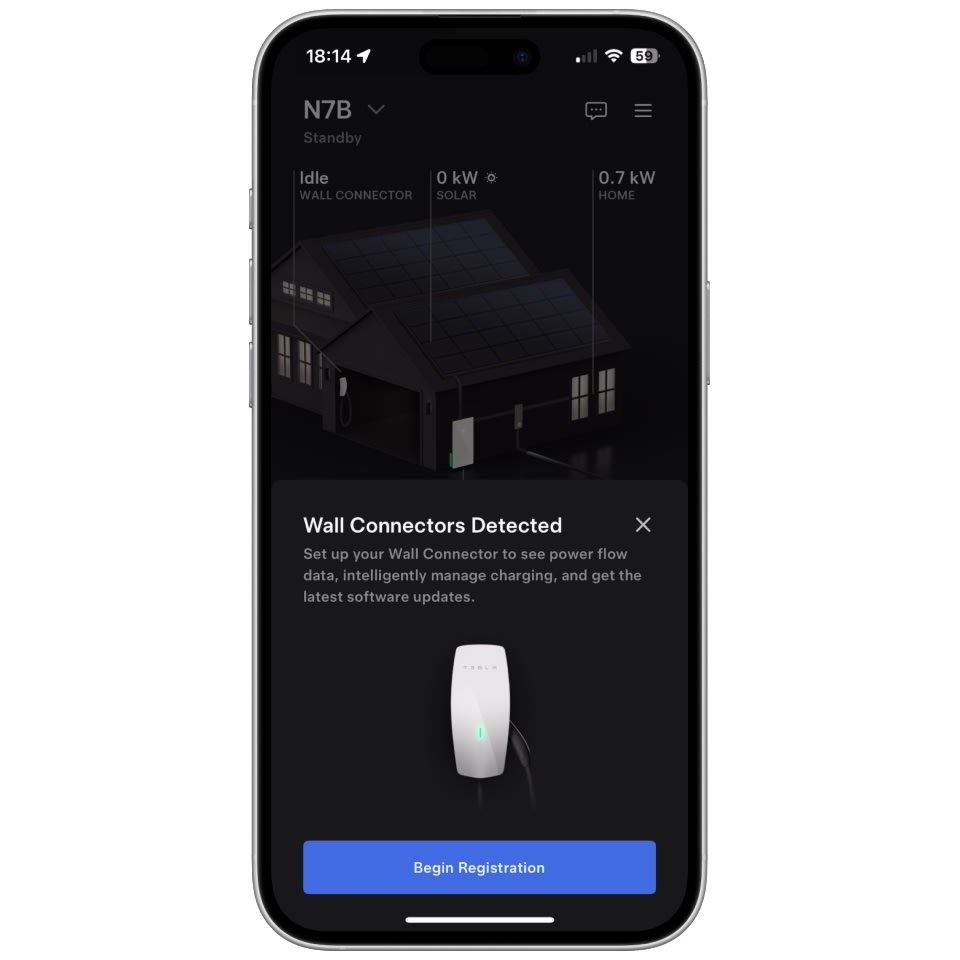
If your Powerwall and Wall Connector are connected to the same Wi-Fi network, the Tesla app will notify you of an unregistered Wall Connector. Before you can register your Wall Connector with your Powerwall, your phone must be paired with your Powerwall.
To pair your phone with your Powerwall, stand near your Powerwall, open the Tesla app and complete the following steps:
- From the home screen, open the ‘Settings’ menu.
- Tap ‘Phone Pairing’ > ‘Begin Pairing.’
- Follow the on-screen instructions to complete the pairing process.
To register your Wall Connector with Powerwall, open the Tesla app and follow these steps:
- If your Wall Connector is nearby, the Tesla app will automatically detect your Wall Connector.
- If your Wall Connector is not detected, tap the menu in the top-right corner and select ‘Add Product.’
- Tap ‘Begin Registration.’ If you have multiple Wall Connectors, select the Wall Connector you want to register.
Once registration is complete, you will see a Wall Connector on the home screen of the Tesla app.
If you do not own a Powerwall but need to register your Wall Connector, follow the process for registering a Wall Connector instead.